
-

IPADDLERS
TUTORIALS
Tutorials and Presentations
Free tutorials and presentations for your use. They have been created for workshop presentations in landscape, or horizontal mode.
NOTE: Some of these were created for older iPads (iOS 9 to iOS 12). However, most of the basics remain the same. If you are looking for user guides for older iPads, it may be best to open the iBooks app and search for the user guide which matches your version of iOS (eg iOS 9 or iOS 12). We are not trying to cover everything here and are only concerned with providing content for the iPaddlers Tutorial Group
Current version is iPadOS 16 (released October 2022). Now available for all compatible devices.
NOTE: Not all new features are available for older devices that support iPadOS 16.



HELP FOR BEGINNERS
There are a number of very good websites providing help for the absolute beginner. I don't know all, but here a few that i am aware of:

The Apple Support webpage has a specific iPad Support page with guides on just about everything iPad. There is a 'Set up your ipad' guide for the absolute beginner, as well as tips on backing up your data and managing the battery, plus a whole lot more.
Apple Support Webpage

Be Connected is an Australian government initiative committed to increasing the confidence, skills and online safety of older Australians. Be Connected aims to empower everyone to use the internet and everyday technology to thrive in our digital world.
Be Connected webpage

GCF Global - Smartphones & Tablets - These free tutorials help you to know your device better so you can do more with the smartphones and tablets you use every day. They help you to set up and maintain your device, understand app permissions, learn hidden features, and more. Amongst all of the different tutorials, there are specific Apple iPhone and iPad tutorials also.
Free iPad Basics Webpage

The PayetteForward channel on YouTube has over 1.5 million subscribers because they are expert in helping people get to know how to fine tune their device for more efficient and safer usage. They spend a lot of time customising the Settings app. Payette Forward helps millions of people solve problems with their iPhones, Apple Macs, and other devices, through easy-to-understand articles, helpful videos, and a support community led by experts. They mainly cover the Apple iPhone, which is almost identical to the iPad (at least in terms of the Operating System). Hint: You may need to pause the videos regularly to take things in, as they do cover things quickly. These are generally more advanced than the absolute beginner's level.
PayetteForward - YouTube Tutorials

The Rich Bowlin channel on YouTube is also a very good resource specifically tailored for retirees and seniors. it mostly covers Apple devices. Very clear and easy to follow.
RichBowlin
Following are the direct links to four of the resources listed above.
iPad Models
Below is a table of iPad models and supported Operating System (iOS and iPadOS).
The iPadOS is currently iPadOS 17 as of 2024.
iPad Support
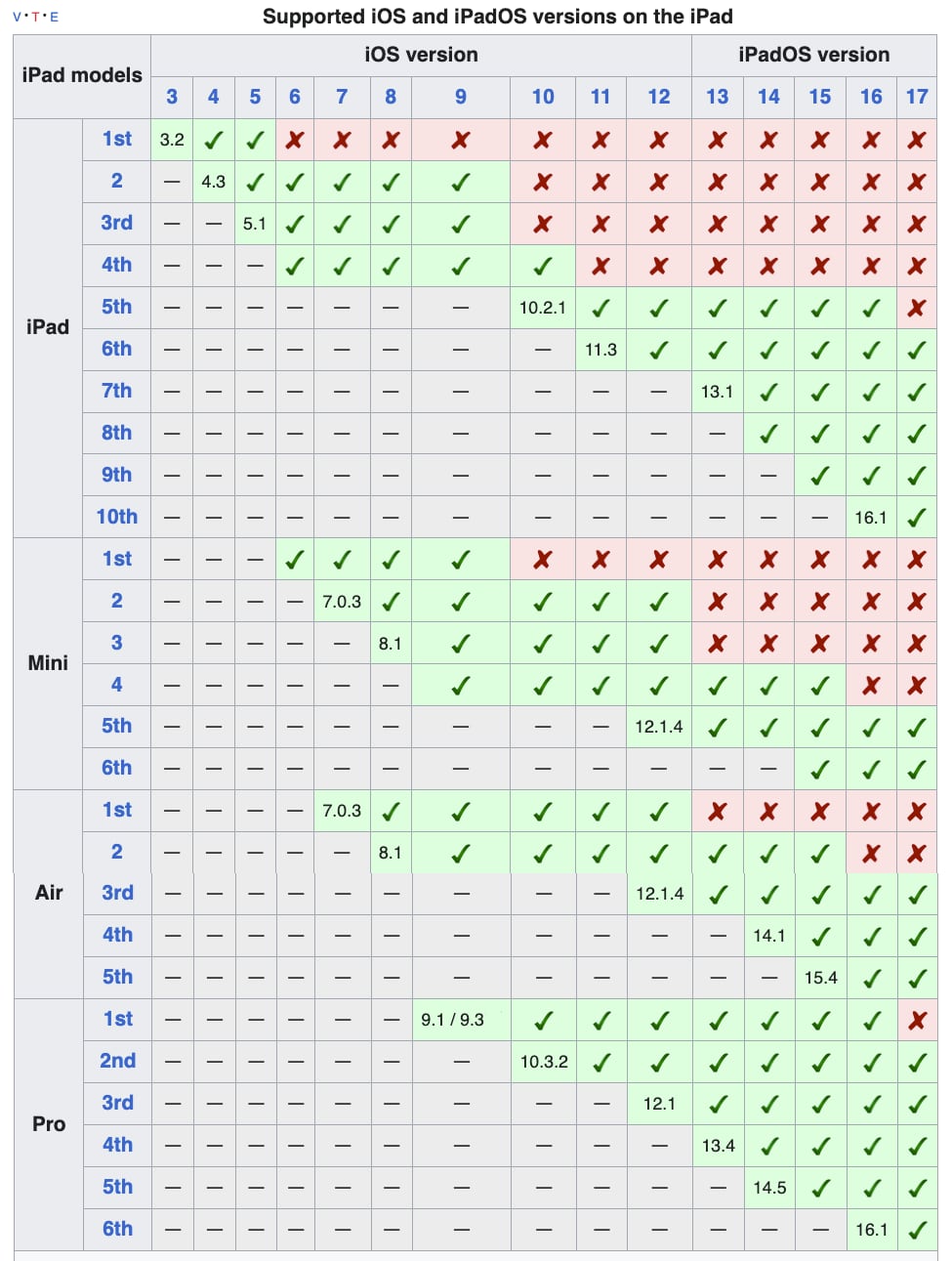
Image courtesy of Wikipedia
Need More Accurate Details?
For up-to-date information visit: Apple Website - iPad
Guardrail Tutorials
How does it work? Devices and functionality we take for granted
The following free tutorial presentations were created prior to 2017 (updated and revised in late 2016). They were designed to help people understand some of the underlying IT technology encountered in everyday life. They are suitable for the average user who requires some IT help that may not be covered very well elsewhere, or is covered in too much technical detail. The emphasis is on visual learning. Much of the material covered is relevant to the Apple Mac and the iPad. However, most of the information applies to other Operating Systems and devices as well. This material was created primarily, but not exclusively, for an iPad tutorial group. I have put this work on hold for now as I concentrate more on iPad tutorials (hence some of it may be a little out of date).
Cloud Storage
PDF (227kB)
WiFi
PDF (285kB)
Mobile Internet
PDF (488kB)
Bluetooth
PDF (196kB)
Internet
PDF (252kB)
Art Apps
PDF (804kB)

Security
PDF (264kB)
Email
PDF (245kB)
File Types
PDF (199kB)
iThings
PDF (285kB)
iPad Apps
PDF (264kB)
Operating System
PDF (248kB)